Inbox
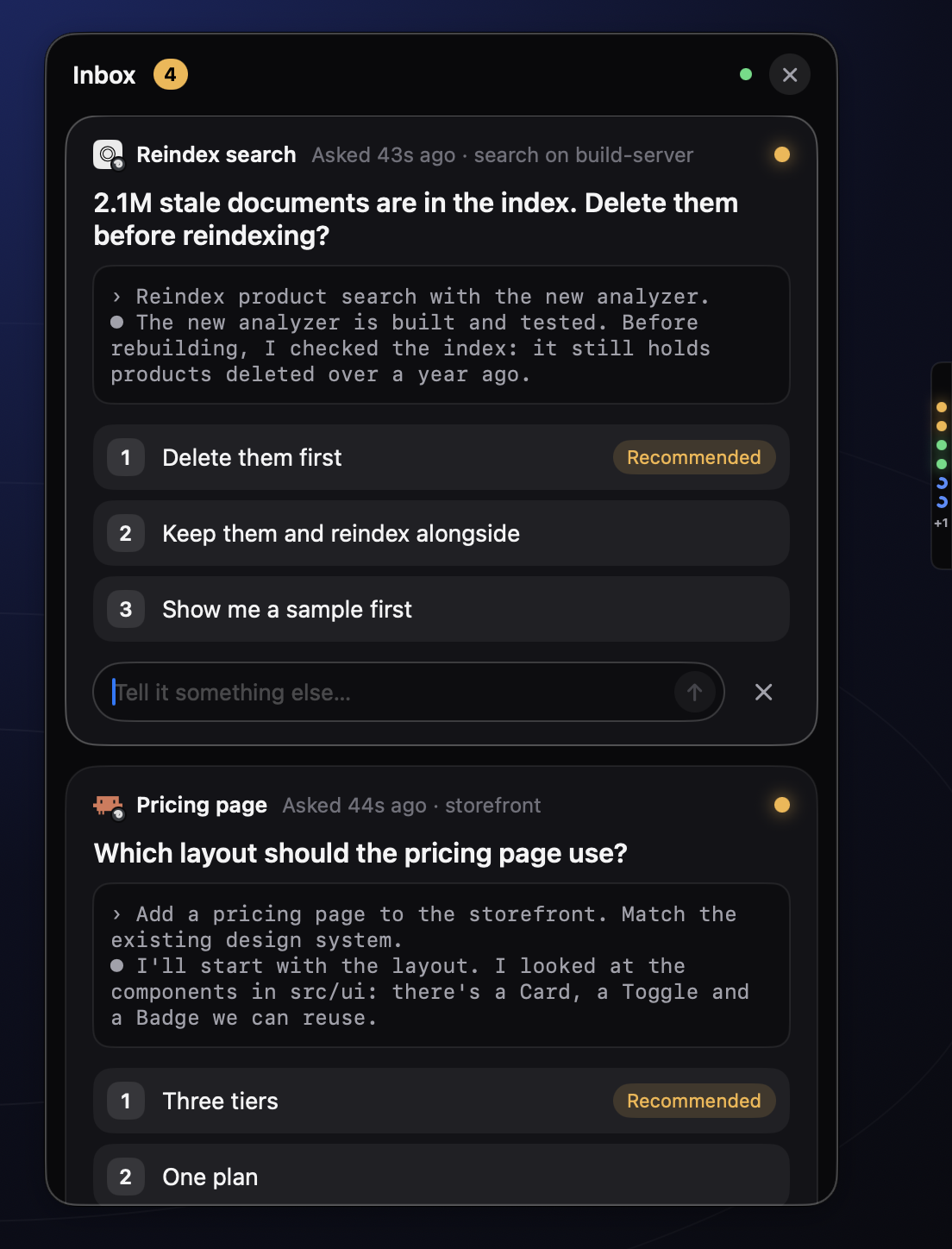
Every agent's questions and finished work, in one list. Answer a multiple-choice question with 1, 2 or 3. Reply to finished work. Clear what you have seen.
For people who run coding agents
Orbit puts every coding agent you run into one slim bar, one Inbox and one voice. See who is working, who needs you and who is done. Answer in a keystroke, or from your phone. Everything between your devices is encrypted end to end.
Mac · iPhone · Linux servers
› claude "Add a pricing page"
● Read  src/pages/index.tsx
● Read  src/components/Plans.tsx
● Write src/pages/pricing.tsx
? Which layout should the pricing page use?
  1. Three tiers
  2. One plan
  3. A comparison table› 1  Three tiers
● Write src/pages/pricing.tsx
● Edit  src/styles/pricing.css
◐ Building the three-tier layout…
› codex "Add Stripe webhooks"
● Read  internal/billing/handler.go
● Write internal/billing/webhook.go
● Write internal/billing/webhook_test.go
◐ Running go test ./internal/billing/…✓ 14 tests passed
✓ Done: webhook handler, signature check, 3 events
Which layout should the pricing page use?
Works with the agents you already run, in herdr or the Claude app
How it works
Install the Mac app. It shows a QR code; scan it with the iPhone app and the two are paired. The code holds a one-time secret, so nobody else can join.
Run the connector on any Linux box your agents live on. Its agents join the same Inbox. It opens no ports; it only dials out to the relay.
curl -fsSL https://dl.agentorbit.app/install.sh | shThe next time an agent asks something, its dot turns amber. Press 1, 2 or 3 on your Mac, or tap the answer on your phone. That is the whole loop.
Features
Orbit meets you wherever you are: the edge of your screen, your Inbox, a hotkey, your phone, or a server across the world.
Every agent's questions and finished work, in one list. Answer a multiple-choice question with 1, 2 or 3. Reply to finished work. Clear what you have seen.
A slim bar on the edge of your screen, one dot per agent. Blue is working, amber needs you, green is done. Hover to peek at the latest messages and running subagents; pop a peek out into its own window.
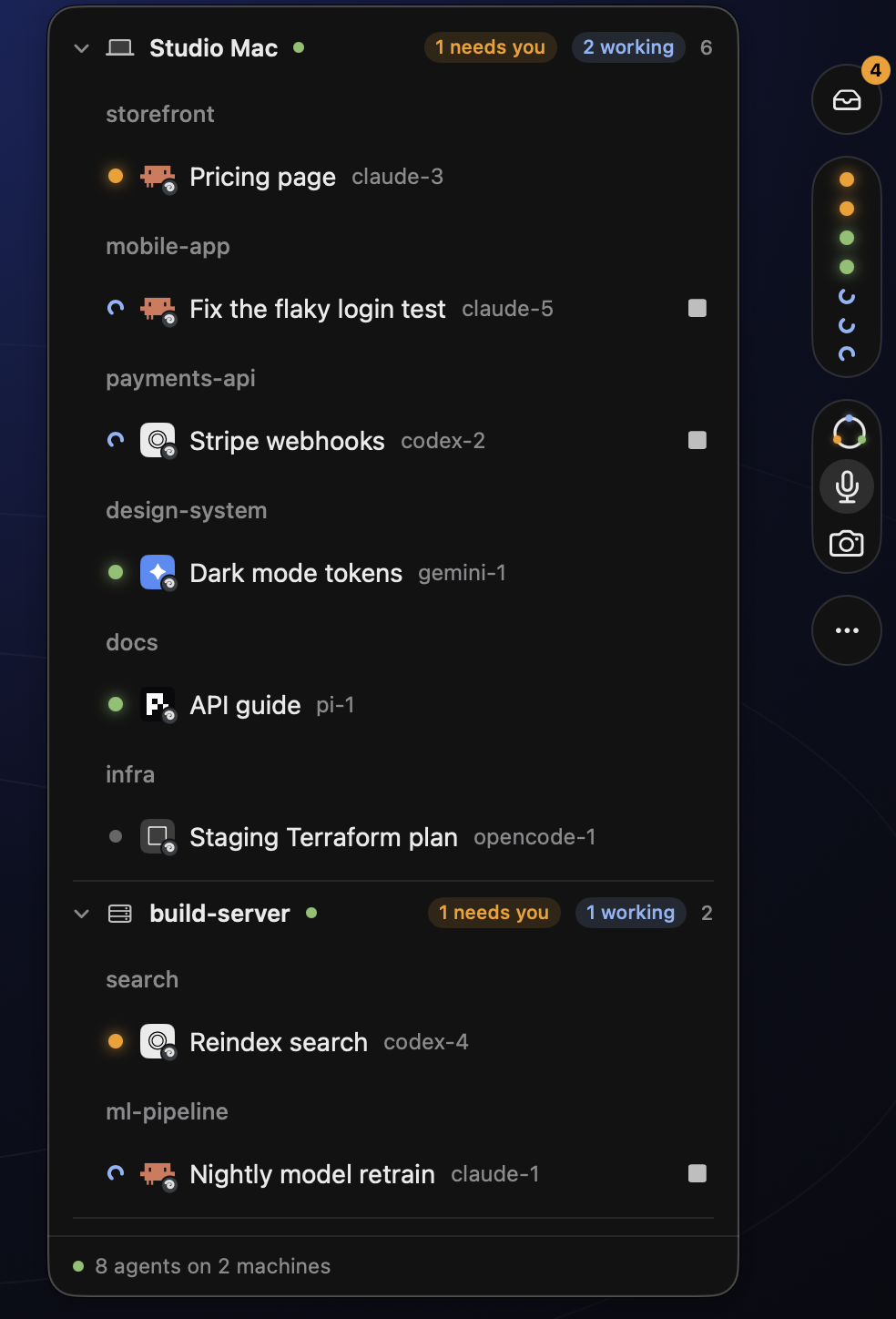
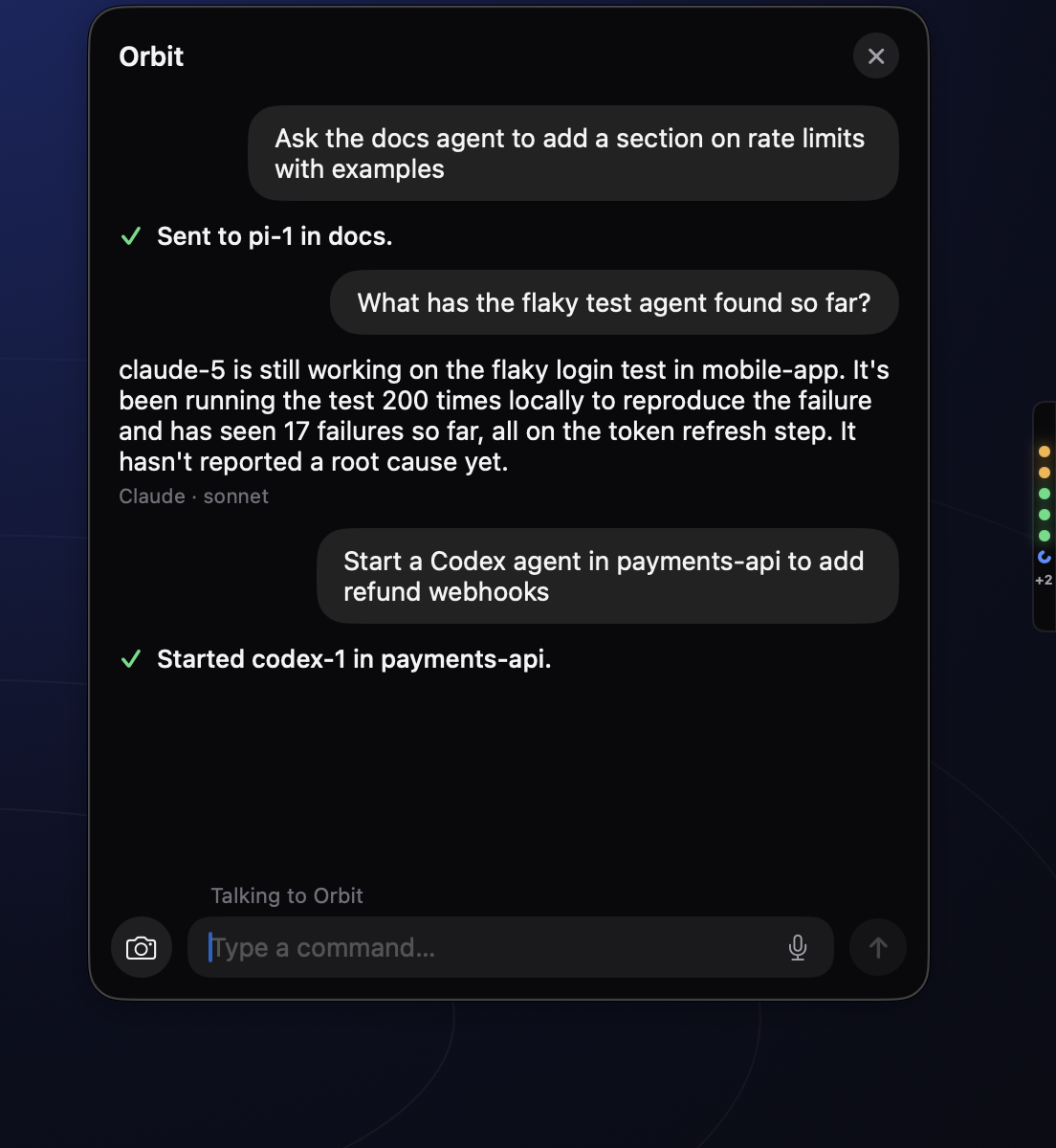
Press a hotkey and say or type what you need. Orbit's router sends it to the right agent, or starts a new one, and tells you when it is done. Drag over part of your screen and the router sees the screenshot.
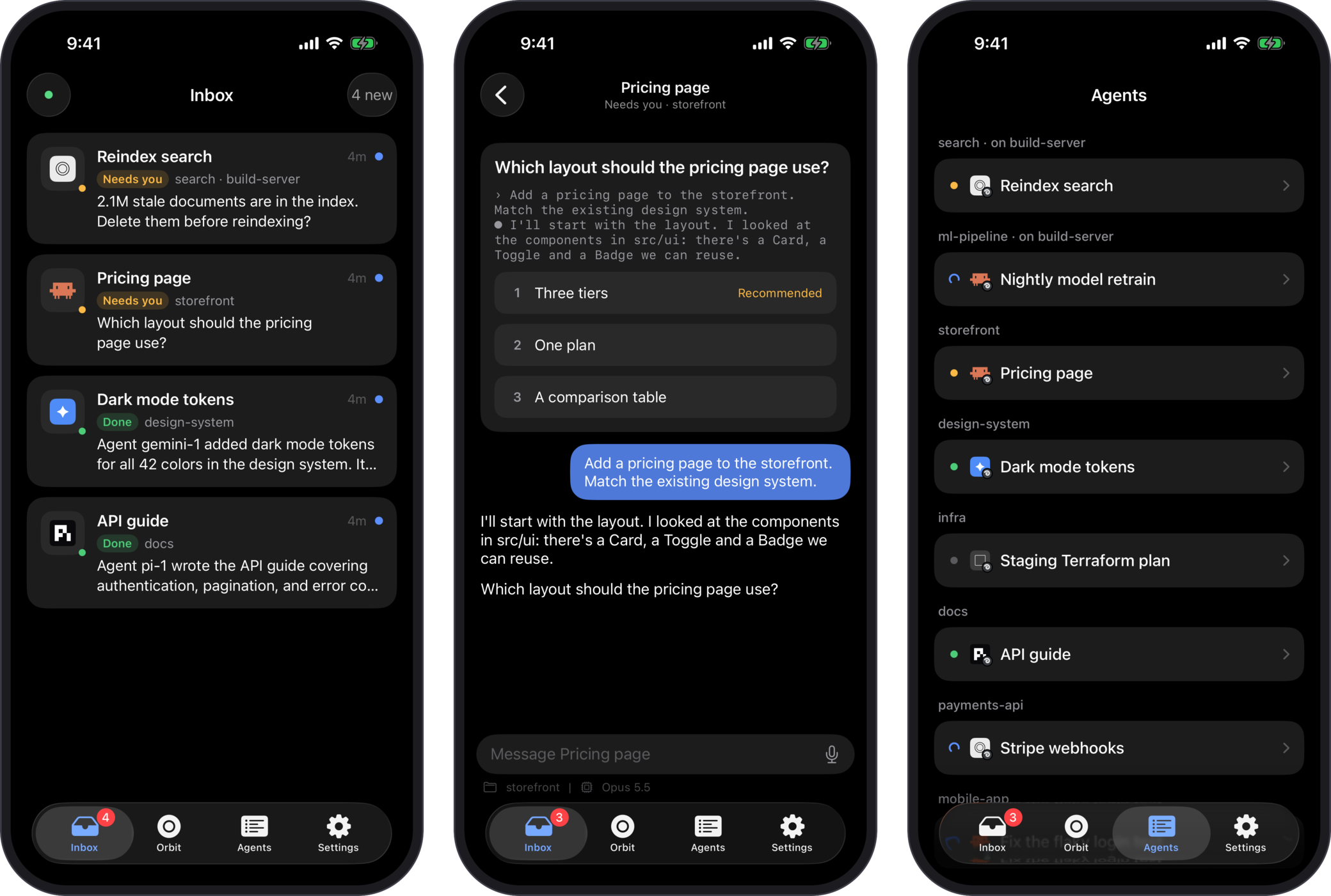
Inbox, Talk, Agents and full conversations from anywhere. Push notifications are decrypted on the phone. Turn on Time Sensitive alerts so questions break through Focus.
One command installs it on a Linux server. Its agents join the same Inbox as the ones on your Mac. It opens no ports; it dials out to the relay and nothing else.
$ curl -fsSL https://dl.agentorbit.app/install.sh | sh
downloading orbit-linux-arm64 … ok
installing systemd user service … ok
✓ joined mesh as build-02
✓ watching herdr: 3 agents

$ orbit status
  ● claude-5   ~/demo/ingest     working
  ● codex-4    ~/demo/ingest     needs you
  ● pi-2       ~/demo/exports    done
The small things
Every answer waits two seconds before it is sent. Press Esc and it never happened.
J and K move between cards, 1 to 9 answer, R replies, E clears. Your hands never leave the keys.
Drag over part of your screen while you talk. The router sees exactly what you mean.
When an agent finishes, Orbit suggests up to two replies. Send one with a single key.
Tell Orbit how you like things done. The router reads your notes before it sends anything.
Settings shows the versions of Claude Code, Codex, Pi and herdr you have, and updates them in place.
A sound when an agent needs you, another when it finishes. Pick one from the Mac's built-in set, or turn them off.
How much of your Claude and Codex plan is left, session and weekly, and when each limit resets.
Themes
The bar, the Inbox, Talk and peeks all follow. The iPhone app has light and dark. Try one below.
2.1M stale documents are in the index. Delete them before reindexing?
End-to-end encrypted
Orbit was built so that the server is boring. It moves sealed messages between your devices and knows nothing about what is inside them.
Read the security modelEach device has its own Ed25519 identity and X25519 key. Messages are signed and sealed with a mesh key that only your devices have.
Whether you run it or we do, the relay only sees sealed blobs, device ids, timing and sizes. It cannot read a question, an answer or a line of agent output.
Notifications are encrypted before they leave your Mac and decrypted on your iPhone. Apple and our push gateway carry an envelope they cannot open.
Your Mac shows a code; the new device proves it has it. The primary Mac signs the device list and can rotate the key, so a removed device is cut off.
Pricing
Orbit needs a relay to move sealed messages between your devices. Let us run it, or run your own.
$3.99/month $20/year
We run the relay at relay.agentorbit.app. End-to-end encrypted: it forwards sealed messages it can't
read. iPhone push included. Nothing to install or keep online.
$50 once
Run the relay yourself: built into the Mac app, or on your own server (we recommend Tailscale). Runs forever. Includes a year of updates; renewing for another year is optional ($25). If you don't, you keep the version you have.
Want iPhone push with your own relay? Add the Push Gateway below.
$5/year
Only Orbit's Apple push key can reach the iPhone app, and we can't hand it out. push.agentorbit.app
holds the key and forwards pushes that are already sealed with your mesh key. It can't read them either.
The iPhone app is free. Plans are bought here on the website, never in the iPhone app. Prices in USD before tax. Checkout and tax are handled by Polar, our merchant of record.
FAQ
Orbit is a Mac app, an iPhone app and a small Linux connector for people who run coding agents such as Claude Code, Codex, Pi, oh-my-pi, OpenCode and Gemini. It shows every agent's state in a slim bar, collects their questions and finished work in one Inbox, and lets you answer with a keystroke, your voice or your phone. Everything between your devices is end-to-end encrypted.
It depends on where your relay runs. With the "This Mac" relay, your Mac has to be awake, since it is the relay. With the hosted relay or a relay on your own server, your iPhone keeps working and can still reach agents on servers. Agents running on a sleeping Mac can't do anything until it wakes, though; Orbit can't change that.
Yes. The iPhone app has the Inbox, Talk, the Agents list and full conversations. Push notifications are decrypted on the phone, and you can turn on Time Sensitive alerts so an agent's question breaks through Focus.
Yes. One command installs the connector on a Linux server (x86_64 or arm64). Its agents join the same Inbox and bar as the ones on your Mac. The connector opens no ports; it only dials out to your relay.
Only ciphertext, device ids, timing and sizes. Messages are sealed with a mesh key that lives on your devices, and the relay never has it. This is true for a relay you run and for the hosted relay we run. See the security page for the full model.
Your Self-Hosted license keeps working forever on the version you have. The license is checked offline, so nothing expires or phones home. If you want the updates released after your year, renew for $25 for another year. If you don't, nothing changes.
Yes. The iPhone app is a free companion and sells nothing. Plans are bought here on the website. The app ships on TestFlight first and the App Store after review.
A Mac with Apple silicon running macOS 14 or later. For the phone, an iPhone on iOS 17 or later. For servers, Linux on x86_64 or arm64. Your agents run in herdr or the Claude app; Orbit watches them and talks to them from there.
Contact us within 14 days for a refund: support@agentorbit.app.
Free iPhone app. One relay plan. Set up in a few minutes.
macOS 14+, Apple silicon · iOS 17+ · Linux x86_64 and arm64